
티스토리 뷰
AI를 잘 쓰기 위한 도구를 이것저것 조합하다 보니까 뇌에서 단축키 혼란을 겪고 있음... 그래서 사용하고 있는 것들의 단축키를 짧게 메모. 훨씬 더 많은 단축키가 있지만 자주 사용하는 것들만 기술함.
# tmux
tmux나 screen 같은 걸 원래 잘 안 썼음. 근데 claude code 때문에 어쩔 수 없이 써야 하는 상황이 왔음. 단축키 몇 개면 불편하지 않게 쓸 수 있으니까 적응하도록 함...
우선 설치는 아래와 같이 진행함
brew install tmux아래는 단축키인데 모든 명령어는 Ctrl + b 이후에 타이핑하면 됨
| 창 가로 분할 | " |
| 창 세로 분할 | % |
| detach | d |
| View all keybindings | ? |
| 세션 rename | $ |
| 판넬 이동 | 방향키 |
| 세션 이름 지정해서 접속 | tmux new -s <세션이름> |
| attach | tmux attach -t <세션이름> |
tmux 창에서 직접 설정할 수도 있지만 모든 세션에 기본 적용하기 위해 ~/.tmux.conf 파일에 아래 내용 추가. 첫 번째 줄은 마우스를 사용할 수 있게 만드는 옵션. 이를 설정하면 탭 간 이동할 때 단축키 누르지 않아도 편함. 두 번째는 tmux에서 일어나는 모든 복사 작업에 대해 macOS 클립보드를 사용하겠다는 의미. 세 번째는 드래그가 끝나면 클립보드로 복사하고 복사모드를 종료하겠다는 의미.
set -g mouse on
set -s copy-command "pbcopy"
bind-key -T copy-mode MouseDragEnd1Pane send-keys -X copy-pipe-and-cancel "pbcopy"
# nvim
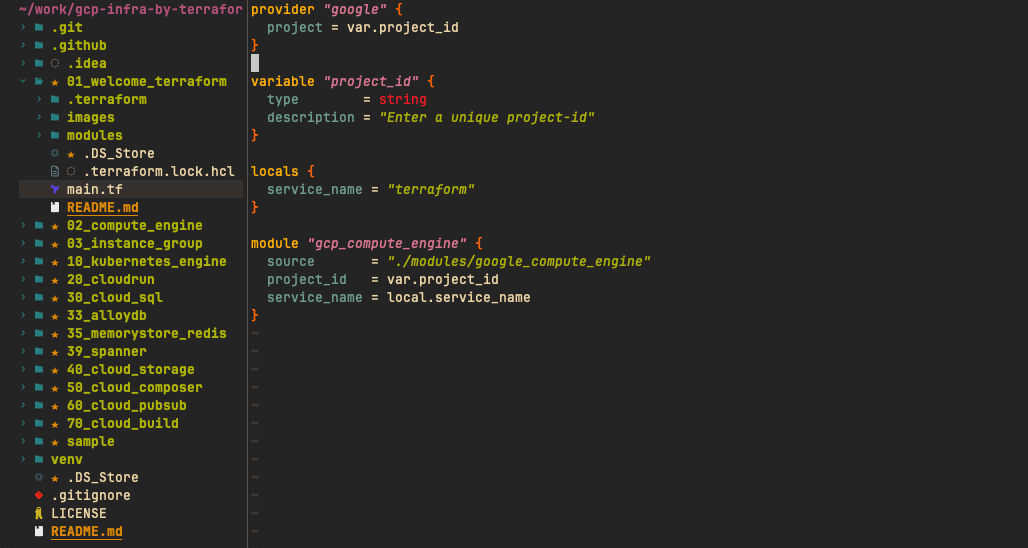
vim을 오랫동안 사랑해 온 유저로써 neovim을 쓰기로 했음. 굳이 vim이 아닌 neovim을 선택한 이유는 탐색기 때문. neovim을 설치하고 plugin을 추가로 설치하면 ide처럼 익숙한 탐색기를 쓸 수 있게 됨
brew install neovim제일 많이 쓰는 단축키는 아래 정도... 나머지는 vim 단축키라서 굳이 적지 않음.
| g? | nvim tree 단축키 도움말 |
| gd | go to define |
| Ctrl + t | 태그 스택에서 이전 위치로 팝(Pop)하여 돌아가기 |
neovim의 설정파일은 ~/.config/nvim/init.lua 이쪽에 저장됨. 내가 최근에 사용하고 있는 설정을 그대로 첨부함
-- Bootstrap lazy.nvim
local lazypath = vim.fn.stdpath("data") .. "/lazy/lazy.nvim"
if not (vim.uv or vim.loop).fs_stat(lazypath) then
local lazyrepo = "https://github.com/folke/lazy.nvim.git"
local out = vihttp://m.fn.system({ "git", "clone", "--filter=blob:none", "--branch=stable", lazyrepo, lazypath })
if vim.v.shell_error ~= 0 then
vim.api.nvim_echo({
{ "Failed to clone lazy.nvim:\n", "ErrorMsg" },
{ out, "WarningMsg" },
{ "\nPress any key to exit..." },
}, true, {})
vim.fn.getchar()
os.exit(1)
end
end
vihttp://m.opt.rtp:prepend(lazypath)
-- Make sure to setup `mapleader` and `maplocalleader` before
-- loading lazy.nvim so that mappings are correct.
-- This is also a good place to setup other settings (vim.opt)
vim.g.mapleader = " "
vim.g.maplocalleader = "\\"
-- LSP keymaps
vim.api.nvim_create_autocmd("LspAttach", {
callback = function(args)
local opts = { buffer = args.buf }
vihttp://m.keymap.set("n", "gd", vihttp://m.lsp.buf.definition, opts)
vihttp://m.keymap.set("n", "K", vihttp://m.lsp.buf.hover, opts)
end,
})
-- auto-reload files changed outside of nvim
vim.opt.autoread = true
vim.api.nvim_create_autocmd({ "FocusGained", "BufEnter", "CursorHold" }, {
command = "silent! checktime",
})
-- disable netrw (recommended by nvim-tree)
vim.g.loaded_netrw = 1
vim.g.loaded_netrwPlugin = 1
-- Setup lazy.nvim
require("lazy").setup({
spec = {
-- colorscheme
{
"ellisonleao/gruvbox.nvim",
priority = 1000,
config = function()
vim.o.background = "dark"
vim.cmd.colorscheme("gruvbox")
end,
},
-- syntax highlighting
{
"nvim-treesitter/nvim-treesitter",
build = ":TSUpdate",
main = "nvim-treesitter",
opts = {
ensure_installed = { "python", "hcl", "yaml" },
highlight = { enable = true },
},
},
-- LSP
{
"neovim/nvim-lspconfig",
dependencies = { "hrsh7th/cmp-nvim-lsp" },
config = function()
vihttp://m.lsp.config("*", {
capabilities = require("cmp_nvim_lsp").default_capabilities(),
})
vihttp://m.lsp.config("terraformls", {
cmd = { "terraform-ls", "serve" },
filetypes = { "terraform", "terraform-vars" },
root_markers = { ".terraform", ".git" },
})
vihttp://m.lsp.enable("terraformls")
vihttp://m.lsp.config("pyright", {
cmd = { "pyright-langserver", "--stdio" },
filetypes = { "python" },
root_markers = { "pyproject.toml", "setup.py", "setup.cfg", ".git" },
before_init = function(params, config)
config.settings = config.settings or {}
config.settings.python = config.settings.python or {}
local bufname = vim.api.nvim_buf_get_name(0)
local dir = vim.fn.fnamemodify(bufname, ":h")
while dir ~= "/" do
local venv_python = dir .. "/.venv/bin/python"
if vim.fn.executable(venv_python) == 1 then
config.settings.python.pythonPath = venv_python
return
end
dir = vim.fn.fnamemodify(dir, ":h")
end
end,
settings = {
python = {
analysis = { autoSearchPaths = true, useLibraryCodeForTypes = true },
},
},
})
vihttp://m.lsp.enable("pyright")
end,
},
-- formatting
{
"stevearc/conform.nvim",
opts = {
format_on_save = { timeout_ms = 500 },
formatters_by_ft = {
terraform = { "terraform_fmt" },
["terraform-vars"] = { "terraform_fmt" },
},
},
},
-- autocompletion
{
"hrsh7th/nvim-cmp",
dependencies = {
"hrsh7th/cmp-nvim-lsp",
"hrsh7th/cmp-buffer",
},
config = function()
local cmp = require("cmp")
cmp.setup({
sorting = {
comparators = {
function(entry1, entry2)
local detail1 = entry1:get_completion_item().detail or ""
local detail2 = entry2:get_completion_item().detail or ""
local req1 = detail1:find("required") ~= nil
local req2 = detail2:find("required") ~= nil
if req1 ~= req2 then
return req1
end
end,
require("cmp.config.compare").offset,
require("cmp.config.compare").exact,
require("cmp.config.compare").score,
require("cmp.config.compare").recently_used,
require("cmp.config.compare").kind,
require("cmp.config.compare").length,
require("cmp.config.compare").order,
},
},
formatting = {
format = function(entry, vim_item)
local detail = entry:get_completion_item().detail
if detail then
vim_item.menu = detail
end
return vim_item
end,
},
mapping = cmp.mapping.preset.insert({
["<C-l>"] = cmp.mapping.complete(),
["<CR>"] = cmp.mapping.confirm({ select = true }),
["<Tab>"] = cmp.mapping.select_next_item(),
["<S-Tab>"] = cmp.mapping.select_prev_item(),
}),
sources = {
{ name = "nvim_lsp" },
{ name = "buffer" },
},
})
end,
},
-- git signs
{
"lewis6991/gitsigns.nvim",
opts = {},
},
{
"nvim-tree/nvim-tree.lua",
dependencies = { "nvim-tree/nvim-web-devicons" },
keys = {
{ "<leader>e", "<cmd>NvimTreeToggle<cr>", desc = "Toggle file explorer" },
{ "<leader>E", "<cmd>NvimTreeFocus<cr>", desc = "Focus file explorer" },
},
config = function()
require("nvim-tree").setup({
filesystem_watchers = {
enable = true,
},
filters = {
dotfiles = false,
git_ignored = false,
},
})
end,
},
},
-- Configure any other settings here. See the documentation for more details.
-- colorscheme that will be used when installing plugins.
install = { colorscheme = { "habamax" } },
-- automatically check for plugin updates
checker = { enabled = true },
})
그리고 아래 두 개 정도 설치해 주면 terraform도 해피코딩 할 수 있게 됨. 이럴 거면 그냥 vscode 쓰라는 말도 있지만, 그건 왠지 손이 안 가서... :)
brew install hashicorp/tap/terraform-ls
brew install pyright
설정을 완료하면 대략 아래와 같은 화면으로 코딩할 수 있게 됨.
# iTerm2
원래 iterm2를 쓰다가 ghostty로 넘어갔었음. 근데 claude code 에이전트 팀 기능이 나오고 tmux와 호환이 iterm2이 좋아서(자동으로 창을 열고 에이전트에게 할당) 다시 iterm2으로 돌아옴. 근데 테마나 정서적인 건 ghostty가 넘사. iterm2를 그나마 쓸만하게 만드는 팁 몇 개 기록.
먼저 nvim에서 디렉터로 아이콘이 깨지는 문제 해결을 위해 폰트 설치.
brew install --cask font-jetbrains-mono-nerd-font설치하고 나서 iTerm2 상단 메뉴의 Settings에 Profile 탭으로 이동한 다음, Text -> Font 항목에서 JetBrainsMono Nerd Font를 선택하면 됨
구린 테마를 탈출하기 위해 Dracula 설치
git clone https://github.com/dracula/iterm.git설치하고 나서 Dracula.itermcolors 파일 클릭하면 iterm2에서 자동으로 감지됨. 폰트 사이즈는 13 정도가 눈이 편함.
'개발 > tools' 카테고리의 다른 글
| cursor(vscode) 설정 (0) | 2025.09.11 |
|---|---|
| PyCharm에서 tftpl 확장자 인식 시키기 (0) | 2024.02.27 |
| pycharm, datagrip 언어를 한글에서 영어로 변경 (5) | 2022.04.08 |
| vim 입문자 핵심 단축키 공략 (0) | 2021.07.16 |
| 테스트 명장, Apache JMeter (2) | 2021.01.22 |
- Total
- Today
- Yesterday